Since the last article, the Trading Setup Analyzer has evolved significantly.
The goal is still the same: helping both beginners and advanced traders to understand market movements in a structured way,
instead of trading purely on gut feeling.
The main additions are: more markets, an extra daily chart, refined trendlines, a micro-impulse module,
and a streamlined config.php that lets you tailor the app more precisely.
More markets & an additional daily chart
Previously, the analyzer focused mainly on the major coins like Bitcoin and Ethereum in the 1m, 15m, 1h and 4h timeframes. In the meantime, the scope has been expanded:
- New symbols: In addition to
BTCUSDTandETHUSDT,SOLUSDT,XRPUSDTandPAXGUSDT(gold) are now available. This is controlled via$ALL_SYMBOLSinconfig.php. - New 1d timeframe: On top of 1m, 15m, 1h and 4h there is now the
1dinterval. This allows the analyzer to evaluate daily structures – useful to put intraday signals into a better overall context. - Extended history: The entries in
$ALL_INTERVALSdefine how many candles are loaded per timeframe (e.g.'4h' => [800, 400],'1d' => [365, 100]). In short: more history, more context.
For you as a user this means: you can now apply the same logic to crypto majors, altcoins and even gold – from short-term scalping up to the daily trend view.
What exactly has changed in config.php?
The config.php file is the technical core of the app.
Many things happen “behind the scenes”, but directly influence how the signals look.
Compared to the previous article, several points have been changed or significantly extended here.
1. REMOTE_BASE instead of only REMOTE_WALLS_BASE
In the older version, most references were to REMOTE_WALLS_BASE.
Now the base URL lives in $GLOBALS['REMOTE_BASE'].
The idea behind this is that the analyzer can, if desired, sync with a server that keeps data (e.g. order book walls) up to date in the background. Especially when you work locally (e.g. on a Windows machine with Laragon), this still gives you clean live data from the server.
2. Trendline configuration for the chart viewer
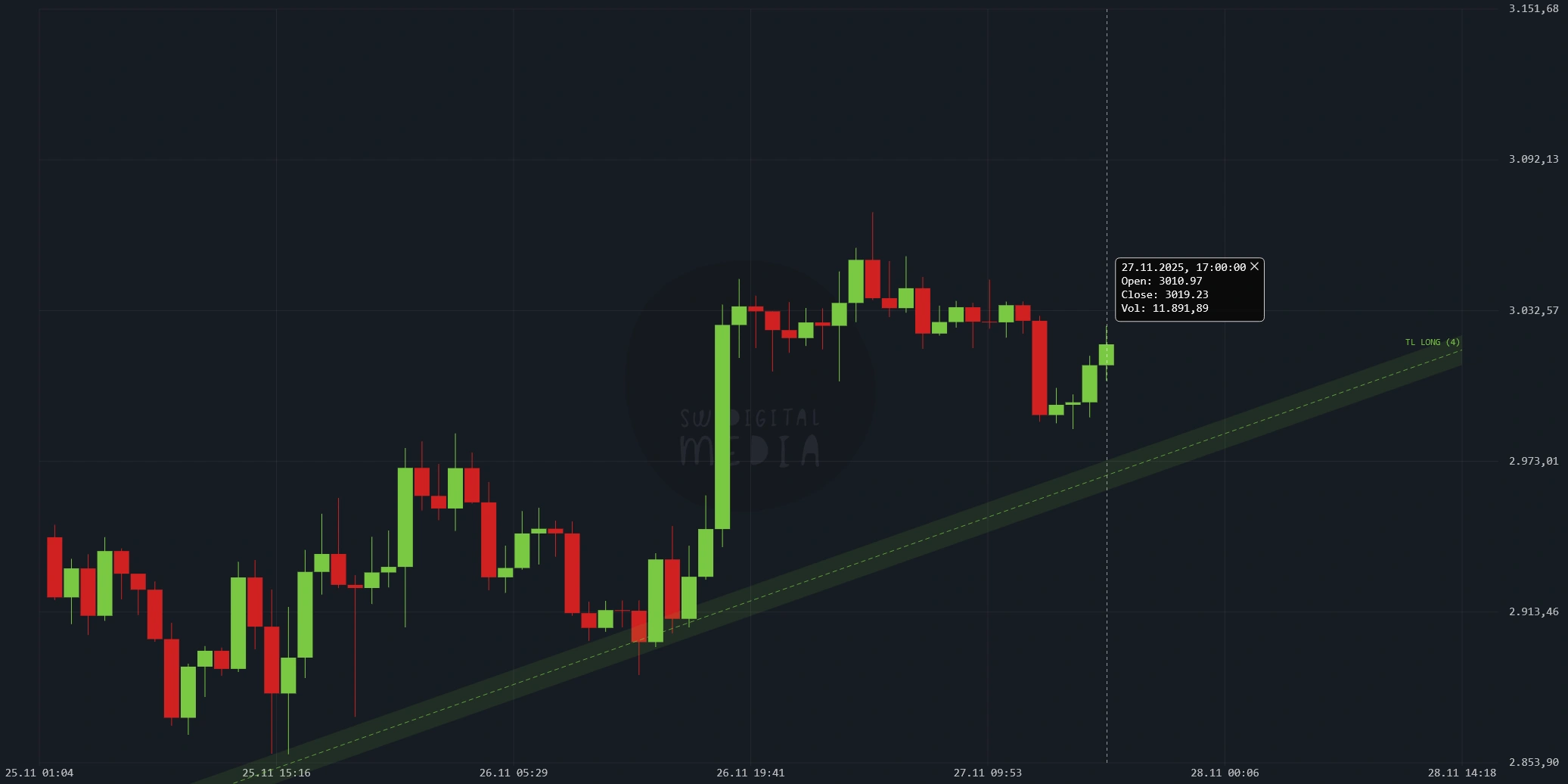
New and visible in the chart viewer: automatically calculated trendlines with corresponding zones.
These are controlled by $TREND_LINES per timeframe (e.g. 15m, 1h, 4h).
- max_bars: How far back in time the algorithm searches for relevant highs/lows.
- min_touches: How often a line must be “touched” before it is treated as a trendline.
- tol_rel / max_break_rel: Tolerances that define how close price has to be to the line/zone to count as a touch or a break.
- ignore_last_bars: The last candles at the right edge are not used as pivots, but serve as a “test zone”. This prevents sudden spikes from bending the trendline out of shape.
In practice this means: you get clean, automatically generated trend zones without having to draw lines yourself – and without every small wiggle constantly redrawing everything.
3. Chart export & high-res screenshots
Also new is the central chart export configuration $CHART_EXPORT_CFG:
- aspect: Aspect ratio – e.g.
'auto','16:9'or'9:16'for social media posts. - scale: Resolution factor (e.g.
2for double resolution). This allows you to create high-resolution screenshots or WebM exports directly from the chart. - time: Optional duration for automatic video/export stop.
For beginners this means: you can document setups, share them or store them cleanly in your trading journal – without relying on external screenshot tools.
4. Micro impulses – fine-tuning with z-score & RSI
A bigger leap is the new micro impulse configuration.
In config.php you’ll find three layers:
$MI_CFG_BY_SYMBOL: Fine-tuning per symbol (e.g. BTC, ETH, SOL, XRP, PAXG) and timeframe (15m, 1h).$MI_CFG_BY_BASE: Profiles per base asset (BTC, ETH, SOL, XRP, PAXG) if there is no symbol-specific profile.$MI_DEFAULT_CFG: Fallback if nothing specific is defined.
Without going deep into the formulas: These values control when the analyzer detects a small but meaningful impulse (e.g. via z-score and RSI) – such as overstretched moves within a Keltner-band type logic. For you as a beginner this runs entirely in the background: you don’t have to configure anything, but you benefit from more precise entry and exit hints.
5. Order block limits & clean-up logic
To prevent the chart from being flooded with zones, there are now global limits:
OB_MAX_ZONES: Maximum number of detected order blocks in total.OB_MAX_ZONES_PER_DIR: How many zones per direction (long/short) remain after filtering.
This ensures that you only see the most relevant order blocks – instead of drowning in a cluttered “zone cloud”.
6. Stability, debugging & connection security
In the current version several points have been added that you rarely see directly, but that are important for stable operation:
- SW_DEBUG_FORCE / SW_DEBUG_MAX_KEEP: Control how many debug blocks are stored internally. This helps with troubleshooting without disturbing live usage.
- CRON_API_TOKEN: A token protects external cron calls (e.g. for updating data) from unauthorized access.
- TLS settings (TLS_CA_EXTRA, TLS_ALLOW_SYSTEM_STORE, TLS_DEBUG_VERBOSE): These options improve SSL/TLS connections to external APIs (e.g. Binance, remote servers). Result: fewer certificate errors and more stable data feeds.
- ENABLE_CONSOLE_LOG: Turns extended debug logs on or off. Very useful in development, used more cautiously in production.
In short: under the hood, the app has become more robust – especially for users who run it locally together with their own server/hosting.
What stayed the same?
The features from the previous article are still there and have mostly been refined rather than changed:
- Sliders & profiles: Trend (monthly/daily), tolerance, volatility, structure, module weights.
- Backtester: Check how a signal would have performed in the past.
- AI analysis: With your own OpenAI API key you can have signals automatically commented.
- Futures sentiment & Trading Performance Overview: Sentiment as a sanity check and a CRV calculator plus trade log as the foundation for your personal performance tracking.
The difference: these modules now build on a more stable, flexible base
in config.php and benefit from the new markets, timeframes, trendlines
and micro impulse filters.
Conclusion: More depth, same idea – structure over gut feeling
The Trading Setup Analyzer has evolved from a pure signal app into a flexible toolbox:
- More markets (including gold) and an extra daily chart.
- Automatic trendlines with clear zones instead of line chaos.
- Micro impulses that capture subtle overextensions and mean reversions.
- Configurable limits for order blocks and demo features.
- More stable connections and better debugging options in the background.
For beginners this means: you don’t need to understand or touch everything that’s inside config.php.
What matters is knowing that this is where the strictness, caution level
and level of detail of the analyzer are controlled.
If you later want to go deeper, you can use this file to adapt the behavior precisely to your own trading style.